GRAB VR Guide 2026: Movement, Levels, Editor, Shop and Chat
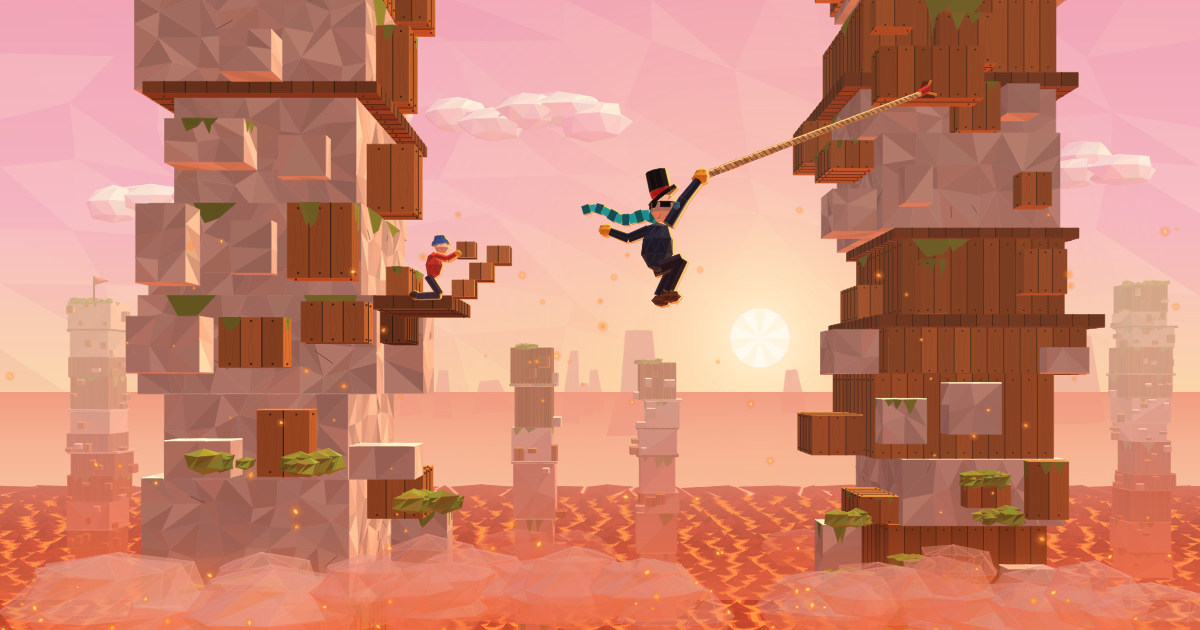
GRAB is a free multiplayer parkour game by SlinDev for Meta Quest 2, Quest 3, Quest 3S and Quest Pro. On November 24, 2026, its VRDB page shows a 4.8-star rating from 19,698 ratings, a Quest release date of August 8, 2024, and a price of free. The Steam version is free too, came out on April 27, 2023, and promises cross-platform multiplayer with up to 12 players.
Most of what there is to play in GRAB is made by its players, and most of what makes it worth playing for a long time is the level editor. This guide covers both, for new players and for parents of kids who play: how the movement works, how to find levels that suit you, how to build with a friend, what the shop sells, and how voice chat with strangers is handled.

What GRAB is: a free VR parkour game built from player-made levels
The goal of every level is simple. In the words of the Steam store page, you “climb, jump, slide and swing through the levels to reach the end, but don’t fall or touch the lava.” The same page lists tutorial levels to get started, a built-in editor, and “over 350000 levels made by the community.” The Quest store description, which the GRAB page on VRDB reprints, gives a bigger number: “over a million player-made levels.” The two pages give different counts, but either way there are far more levels than one player could finish.
A few practical details from the VRDB page: the download is 283 MB, an internet connection is required, the game supports standing and room-scale play with controllers, and Meta rates its comfort as Intense.
How GRAB’s movement works: grabbing, climbing and grappling
The store description on VRDB sums up the idea: “Grab the air to launch yourself in any direction. Swing with grappling hooks, climb impossible walls, and fling yourself through space.” In practice that means three tools:
- Grabbing. Grab the air or a surface and pull to launch yourself, which the Steam page calls “active and fun physics based controls.”
- Climbing. Hand over hand up walls and ledges.
- Grappling. Hooks that let you swing across gaps. Level builders decide which surfaces can be grappled: the November 6, 2025 update added a “Can Grapple” checkbox for blocks.
Because you throw yourself through space, the Intense comfort rating is earned. If you are new to VR, start with short sessions and read our guide to stopping VR motion sickness.
Players who come from Gorilla Tag can now find that style of movement inside GRAB too. The September 3, 2026 update added a “Monkey Movement” mode to gravity blocks. SlinDev’s store post for that update, reprinted by AltLab VR, says it “adds Gorilla Tag style movement that players can use in their levels.” So it is not a separate game mode: it is something a level’s builder turns on for part or all of a level. The October 1, 2026 update let monkey mode grab onto grabbable surfaces as well.
Finding good GRAB levels: from the tutorial to the hardest community courses
Start with the tutorial levels, which the Steam page lists among the game’s features. After that, the level browser is your main tool, and it has grown a set of filters over the years:
- Difficulty. Since the April 12, 2024 update, levels can be filtered by difficulty, and the “Random” button only adds levels of the difficulty you picked. This is the simplest way to climb from easy courses to hard ones at your own pace.
- Tags. The April 30, 2024 update added tag filters, and creators can give each level up to two tags.
- Leaderboards and replays. Since the September 4, 2025 update, a finished run uploads a replay, and you can watch replays from a level’s leaderboard if the level allows it. Watching how a fast player gets through a section is often quicker than working it out alone.
- Top Players. The March 5, 2026 update added a global leaderboard where beating harder levels raises your score. Only recent plays count and they lose value over time, so new players can catch up.
Two newer features help with hard levels in particular. Practice mode, added on August 6, 2026, lets you become an editor player in a level and lobby that allow it, move around freely and practice one section. You cannot finish the level while practicing, and your progress in it is lost. Lobby tags, added on June 5, 2026, let a host tell other players what to expect before they join, and the July 2, 2026 update added a horror tag for lobbies.
In a lobby, the game can switch to the next level automatically once everyone has finished. The June 16, 2023 update added an option to turn that automatic level switching off. If you do not intend to beat the current level, the forfeit button from the February 6, 2025 update tells the host so, and the same update stopped counting players who are inactive for 30 seconds when the level changes automatically.
Building GRAB levels together in the editor
The editor is where GRAB differs most from other free Quest games. The Steam page describes a built-in editor “that lets you build levels together with your friends in multiplayer with quick switching between testing and editing.” Two people can build the same course at once, then jump in and test a section without leaving.
Where to start
The June 5, 2025 update added a basic and an advanced editor tutorial. Do the basic one together before you start a shared project, so both builders know how to place, group and move blocks.
The building blocks
Since March 2025, SlinDev has added a long list of tools, each announced in the game’s Steam notes:
- Triggers that control animations when interacted with, for doors and moving obstacles (March 6, 2025).
- Sound blocks with a built-in synthesizer (August 9, 2025).
- Physics objects that players can grab and carry (October 2, 2025).
- Lights, with color, range and brightness that code can control (March 5, 2026).
- Clouds in a level’s ambient settings (October 1, 2026).
- Gravity blocks, including the Monkey Movement mode described above (September 3, 2026).
Code blocks
Code blocks are GRAB’s simple programming system, and they suit an older kid who wants to go beyond placing blocks. Since the February 5, 2026 update, code can read player positions, change the text on signs and the color of blocks, and run as shared code synced to every player, which the notes say allows “things like cars and random number generators.” The April 2, 2026 update added a coding tutorial and tooltips in the code editor, and the July 2, 2026 update let code teleport the player and change their velocity.
Publishing
A level needs a start and a finish before it can be verified, according to the November 22, 2023 notes, and the host submits it from the editor’s pause menu with “Submit for Verification,” as the April 30, 2024 notes describe. Add your two tags at the same time so the right players can find it.
GRAB Coins, the $19.99 Starter Pack and random items
GRAB itself costs nothing. Its shop sells mostly cosmetic items such as hats, outfits, grappling hooks and checkpoints. On November 24, 2026, the only add-on on its VRDB page is the Starter Pack at $19.99.
The pack’s store text, reprinted on QuestStoreDB, lists a top hat in four color variations, a bucket hat in three, headphones, boxing glove grappling hooks in three colors, an arrow grappling hook, a flag checkpoint, a sign checkpoint that changes its message each time it is placed, and a bonus of 1,000 GRAB Coins.
GRAB Coins are the shop’s currency. They arrived in the March 26, 2024 update, and players do not have to pay for them: the September 7, 2024 update set the free allowance at 10 coins a day for everyone, and the July 3, 2025 notes say daily coins and tips are claimed from the ATM in the shop. Players can also tip level creators, a feature added on April 12, 2024, and a referral code earns coins for both players when a friend joins, per the March 6, 2025 notes.
For parents, the line that matters is the age rating. The VRDB page shows Everyone 10+ for Fantasy Violence, with the interactive elements “Users Interact” and “In-Game Purchases (Includes Random Items).” The ESRB ratings guide defines that last label as purchases where the player does not know beforehand exactly which items they will receive, such as loot boxes, item packs or mystery awards. Check what a shop item gives before a child spends money on it. Our guide to in-app purchases for parents, which covers Gorilla Tag, Yeeps and Animal Company, walks through Meta’s purchase approvals and store PIN, which work the same way for GRAB.
Voice chat with strangers: lobbies, Voice Patrol and hiding other players
“Users Interact” means voice chat with people you do not know, and GRAB starts every session in a shared social hub, according to the July 3, 2025 notes. Here is what is in place:
- Automatic voice moderation. Since the February 8, 2024 update, Modulate’s ToxMod monitors public lobbies for voice chat toxicity. The November 5, 2026 update added a second system, Voice Patrol, and the notes say both are active for now, with Voice Patrol possibly replacing ToxMod in the future.
- Report, mute or kick. The player list shows who is speaking so you can tell “who to report, mute or kick,” as the May 11, 2023 notes put it, and players who leave stay on the list for 30 seconds so they can still be reported, per the June 16, 2023 notes.
- Space from other players. The spawn area of the social hub is protected by a bubble, and other players inside it turn into a small floating light (July 3, 2025). The August 6, 2026 update replaced the hide-players checkbox with a slider that sets how close other players can get before they fade out, and added a setting to disable grabbing other players. Players can hold on to each other, which is why the June 16, 2023 update already stopped anyone from holding on to other players for the first 5 seconds after respawning.
- Knowing what a lobby is. Lobby tags, including the horror tag, tell a child what kind of session they are joining before they join it.
None of this replaces a parent nearby for younger players, but together it gives a kid real tools to step away from someone they do not want to deal with.
Should you try GRAB?
GRAB costs nothing to install, so the only real question is comfort. If flinging yourself through the air sounds fun rather than queasy, it offers more levels than you will ever finish, an editor deep enough to keep a young builder busy for years, and a shop that daily free coins let you browse without paying. For more free picks, see our list of the best free Quest games of 2026 and VRDB’s list of platformer games for Quest.
